The Best Financial Statement Preparation Tools in Luxembourg (2026)
June 5, 2026
Financial Reporting

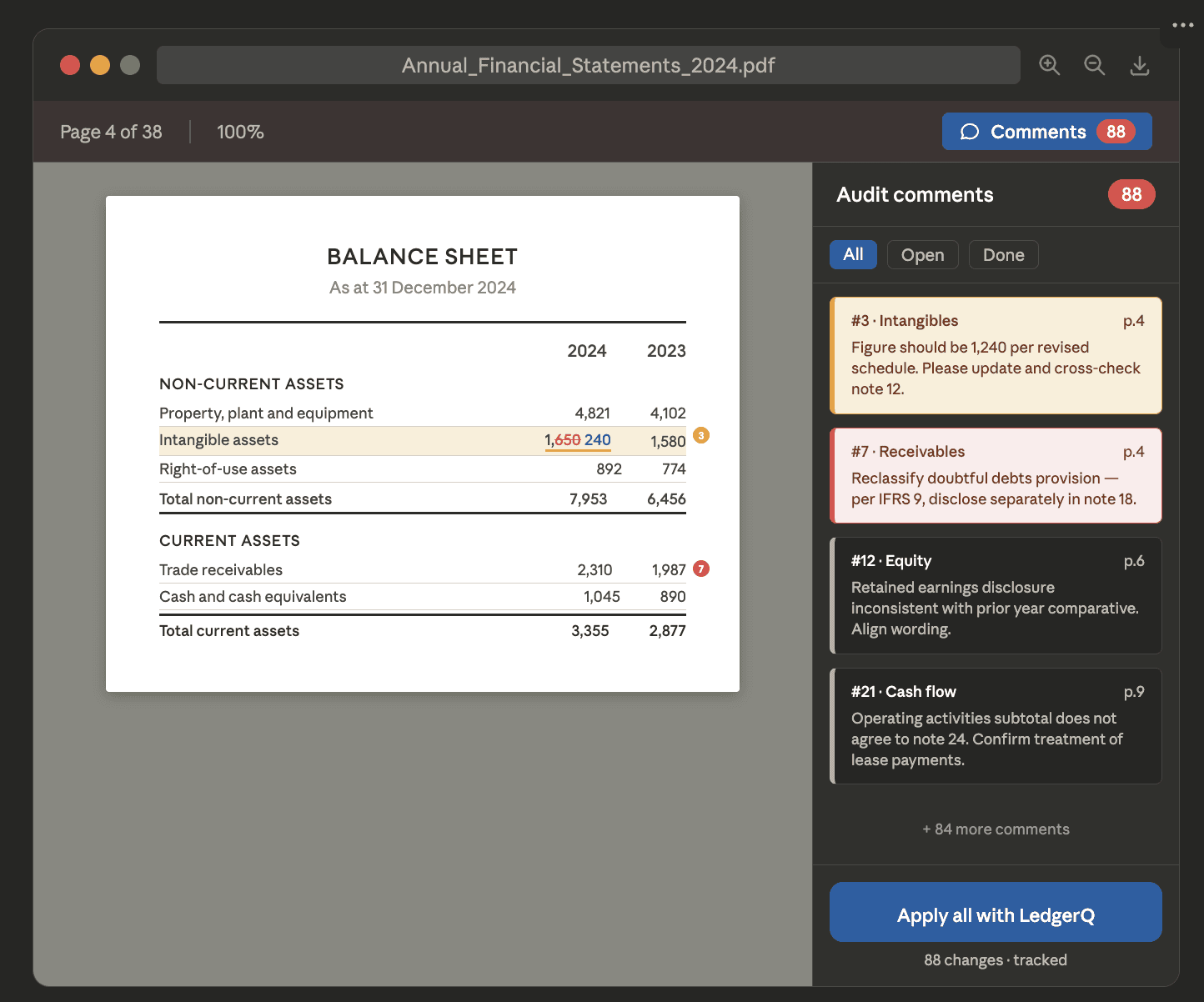
Auditor's comments applied automatically.
LedgerQ ingests auditors’ comments directly from annotated PDFs and automatically updates the financial statements in Word, saving my team hours of manual work.

Jade Leroy, Head of Fund Accounting
Want to see LedgerQ in practice?
The Tools
LedgerQ
Most tools in this category solve one question: how do you go from a trial balance to a set of financial statements? LedgerQ solves the full financial statement preparation problem in Word — generating the document, keeping it in sync with Excel, and handling everything the auditor sends back.
In practice, financial statement preparation involves three recurring headaches. First, tables built in Excel have to be manually reformatted in Word — column widths, decimal places, subtotals — every time a figure changes. Second, notes and disclosures need to stay consistent with the numbers across the balance sheet, P&L, and schedules. Third, when the auditor returns comments on the draft, someone has to work through each one manually, update the figures, adjust the disclosure language, and check that nothing was missed across entire report. For a standard report with 60-plus audit comments, that process alone takes the better part of a day and carries real risk of inconsistency.
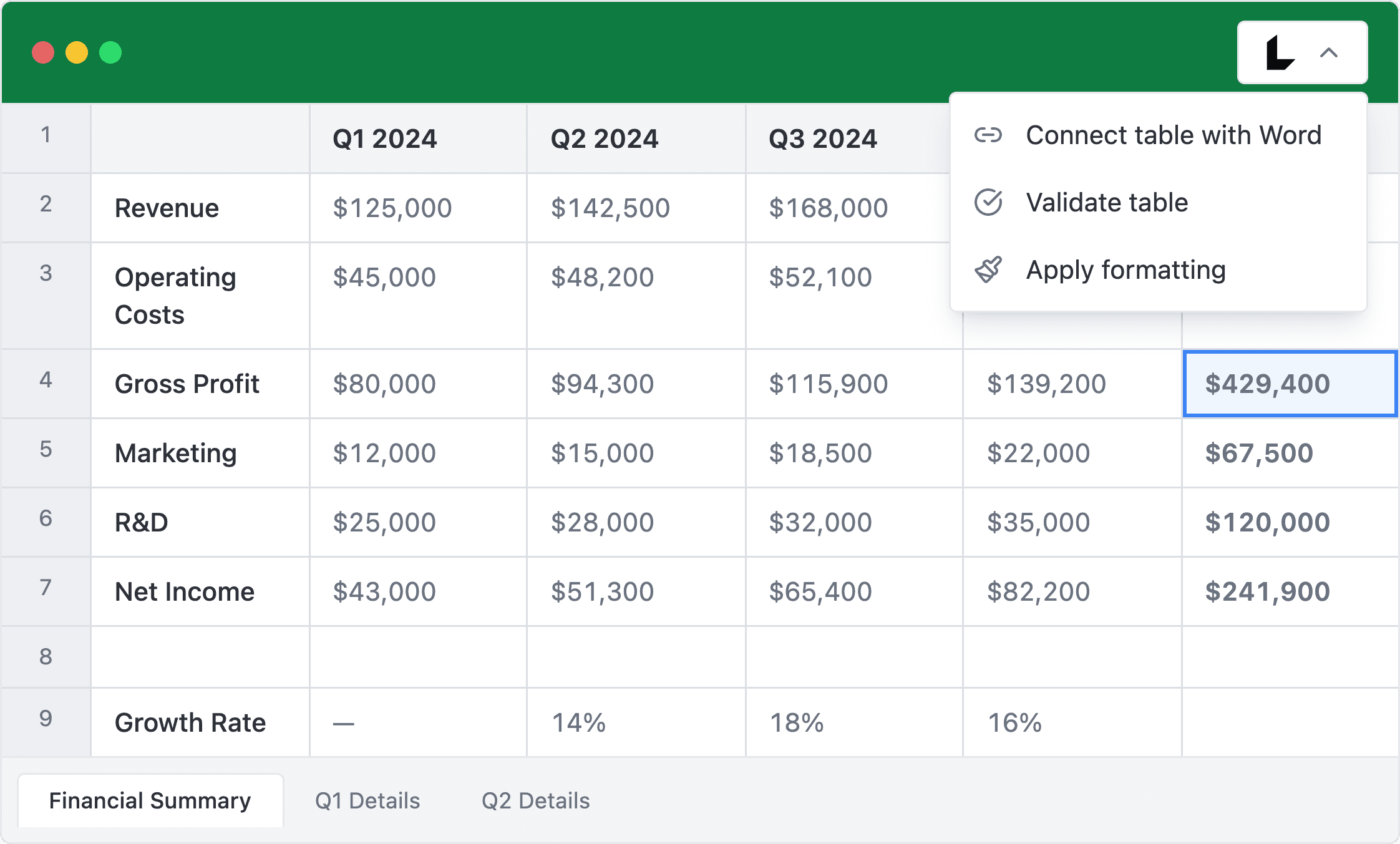
LedgerQ handles all three. Tables in Word are linked directly to Excel — when a figure changes in the working papers, the Word document updates automatically, with formatting intact. Notes and disclosures are linked to the underlying data, so cross-references stay consistent without manual checking. And when the auditor’s annotated PDF arrives, LedgerQ reads the comments and applies them directly to the Word document using track changes, so the team can review each amendment before signing off the draft.
What it handles well:
Automated generation of financial statement tables from accounting data, including Statement of Investments with % of NAV
Live Excel-to-Word linking: figures update automatically when working papers change
Automated notes and disclosure updates, with cross-references maintained throughout
AI-powered application that analyzes auditor comments from annotated PDFs and applies proposed changes with full track changes in Word.
Consistent formatting across the entire document — fonts, column widths, decimal places — without manual intervention
Works across entity types: commercial companies, private equity funds, SPVs, SICAV, RAIF, SIF, UCITS, and more.
Supports all financial reporting standards
The honest limitation: LedgerQ is focused purely on financial statement preparation automation. Other reporting such as BCL, CSSF regulatory filings, or tax declarations are not covered.
Choose LedgerQ if you prepare financial statements in Word and want to eliminate the manual work across the full cycle: from Excel data to formatted tables, through notes and disclosures, to a clean final report after audit.
CaseWare
CaseWare (Lux FinTax) covers both financial statement preparation and direct tax declarations — Form 500 and 506A for corporate income tax, municipal tax, and net worth tax. It maps most data to the correct tax codes automatically, generates compliant appendices, and includes a dashboard for managing multiple client files in parallel. For firms handling tax declarations alongside annual accounts, it removes the need to run two separate workflows. For a side-by-side look at how CaseWare compares with LedgerQ, see our Caseware alternative guide.
The honest limitation: The revision cycle after audit review is not covered. The cloud architecture also means firms with strict data residency requirements should confirm hosting arrangements before committing.
Camele’on
Camele’on is built specifically for fiduciaries and accounting professionals. It connects to accounting systems to pull data and generate financial statements, tax forms, VAT returns.
What distinguishes Camele’on from the CaseWare products is breadth: it also handles CRM, KYC/AML screening, contract management, timesheets, and invoicing.
The honest limitation: Users consistently report that the interface feels dated, and the experience of saving and refreshing data is very slow and clunky — a real frustration when working under deadline pressure. For a team that runs dozens of client files simultaneously, that friction adds up.
Fisqal
Fisqal is a cloud ERP built on Microsoft Dynamics 365 Business Central and localised for Luxembourg by SK Consulting. It includes the PCN 2020 chart of accounts, CTIE-approved eCDF and FAIA filing, automated VAT declarations, and bank connectivity via open banking APIs. The accounting-only plan is positioned as a replacement for desktop tools like Sage BOB 50 or Gesall.
Because it runs on Business Central, Fisqal suits organisations that want financial reporting embedded in a broader operational platform — covering AP/AR, fixed assets, inventory, projects, and multi-entity consolidation in one place. For companies with entities across the Greater Region, it also handles multi-currency, multinational VAT, and consolidated reporting within a single tenant.
The honest limitation: Fisqal is an ERP first. Teams that only need year-end statutory accounts and are not looking for a full operational platform may find it more infrastructure than the task requires.
Match the Tool to the Problem
If your bottleneck is automating financial statement preparation A-Z: LedgerQ.
If your bottleneck is generating the initial accounts from a trial balance, with tax declarations included: CaseWare.
If you want financial compliance inside a cloud ERP: Fisqal.
Comparing tools outside Luxembourg? See our guide to the best financial statement preparation tools in 2026.
Frequently Asked Questions
How does LedgerQ handle auditor comments?
Auditors typically return comments as annotations on a PDF version of the draft financial statements. LedgerQ ingests that annotated PDF, extracts the comments, and applies the required changes directly to the Word document using track changes. The team can then review each change before accepting it — nothing is applied silently. This replaces what is otherwise a fully manual process of reading each comment and making the edits by hand.
Does LedgerQ work for Luxembourg fund structures?
Yes. LedgerQ works with SICAV, SICAF, FCP, RAIF, SIF, UCITS, Part II funds, securitisation vehicles, and holding structures — any entity that prepares financial statements in Word format. It also handles the Statement of Investments automatically: portfolio data from Excel is grouped, subtotaled, and formatted into a clean Word table including percentage of NAV, without manual reformatting.
How does the Excel-to-Word link work in LedgerQ?
LedgerQ creates a live connection between Excel working papers and the Word financial statements. When a figure changes in Excel — whether it is a late NAV adjustment, a corrected balance, or an updated footnote value — the corresponding table in the Word document updates automatically. Column widths, fonts, decimal places, and totals are governed by predefined formatting rules, so the layout stays consistent without any manual intervention.
Which accounting systems does LedgerQ work with?
LedgerQ works alongside any accounting system because it operates at the Excel-to-Word layer, not at the general ledger level. Teams using Sage, as well as those on other platforms, can use LedgerQ provided their working papers are in Excel and their financial statements are drafted in Word. It does not require replacing or integrating with the underlying accounting system.
What accounting standards does LedgerQ support?
LedgerQ is standard-agnostic — it works on the Word document regardless of whether the accounts are prepared under Lux GAAP, IFRS, or US GAAP. This makes it suitable for commercial companies, private equity funds, and regulated fund structures that may report under different frameworks depending on their investor requirements.