Automate financial statement preparation

From trial balance to financial statements - automatically

As Featured In

Testimonials

Don't just take our word for it

Live connection between Excel and financial statements

Excel worksheets are central to our workflow. LedgerQ updates the financial statements automatically when Excel changes, reducing errors and giving us confidence that numbers are reconciled.

Zoe Lavigne, ACCA, Controller

Automatic updates based on the auditor's comments

LedgerQ automates both the first draft and subsequent revisions based on the auditor's comments. This is important to us, as we spend more time on later drafts than on the initial one.

Olivia Turner, Head of Fund Accounting

Formatting of the report is automated

We use BOB 50 for accounting, but preparing financial statements was time-consuming, especially keeping the formatting of tables and text consistent. LedgerQ handles it automatically.

Laurent Durand, FinRep Manager

Year-end adjustments are always accounted for

Year-end adjustments used to require constant updates to financial statements. LedgerQ now handles it automatically, so we don’t have to worry about missing changes.

Ivy Elliott, Finance Manager

Live connection between Excel and financial statements

Excel worksheets are central to our workflow. LedgerQ updates the financial statements automatically when Excel changes, reducing errors and giving us confidence that numbers are reconciled.

Zoe Lavigne, ACCA, Controller

Formatting of the report is automated

We use BOB 50 for accounting, but preparing financial statements was time-consuming, especially keeping the formatting of tables and text consistent. LedgerQ handles it automatically.

Laurent Durand, FinRep Manager

Automatic updates based on the auditor's comments

LedgerQ automates both the first draft and subsequent revisions based on the auditor's comments. This is important to us, as we spend more time on later drafts than on the initial one.

Olivia Turner, Head of Fund Accounting

Year-end adjustments are always accounted for

Year-end adjustments used to require constant updates to financial statements. LedgerQ now handles it automatically, so we don’t have to worry about missing changes.

Ivy Elliott, Finance Manager

Features

Draft financial statements faster

LedgerQ automates the slow, error-prone financial statement preparation

Automated tables

Generate any financial statement table, automatically

Drop in an extract from your accounting software and LedgerQ builds the full statement table for you — structured and formatted. Balance sheet, P&L or statement of investments in one click.

Balance sheet

Auto-formatted

Assets

Non-current assets

1,240,000

Current assets

860,500

Total assets

2,100,500

Equity & liabilities

Equity

1,150,000

Liabilities

950,500

Total equity & liabilities

2,100,500

Financial statements

Tracked changes

AK

Auditor comment

Update revenue to the final audited figure.

Notes · Revenue

Revenue increased to 1,120,000 1,180,000 in the reporting period.

Change applied

Microsoft

Audit comments

Apply audit comments, automatically

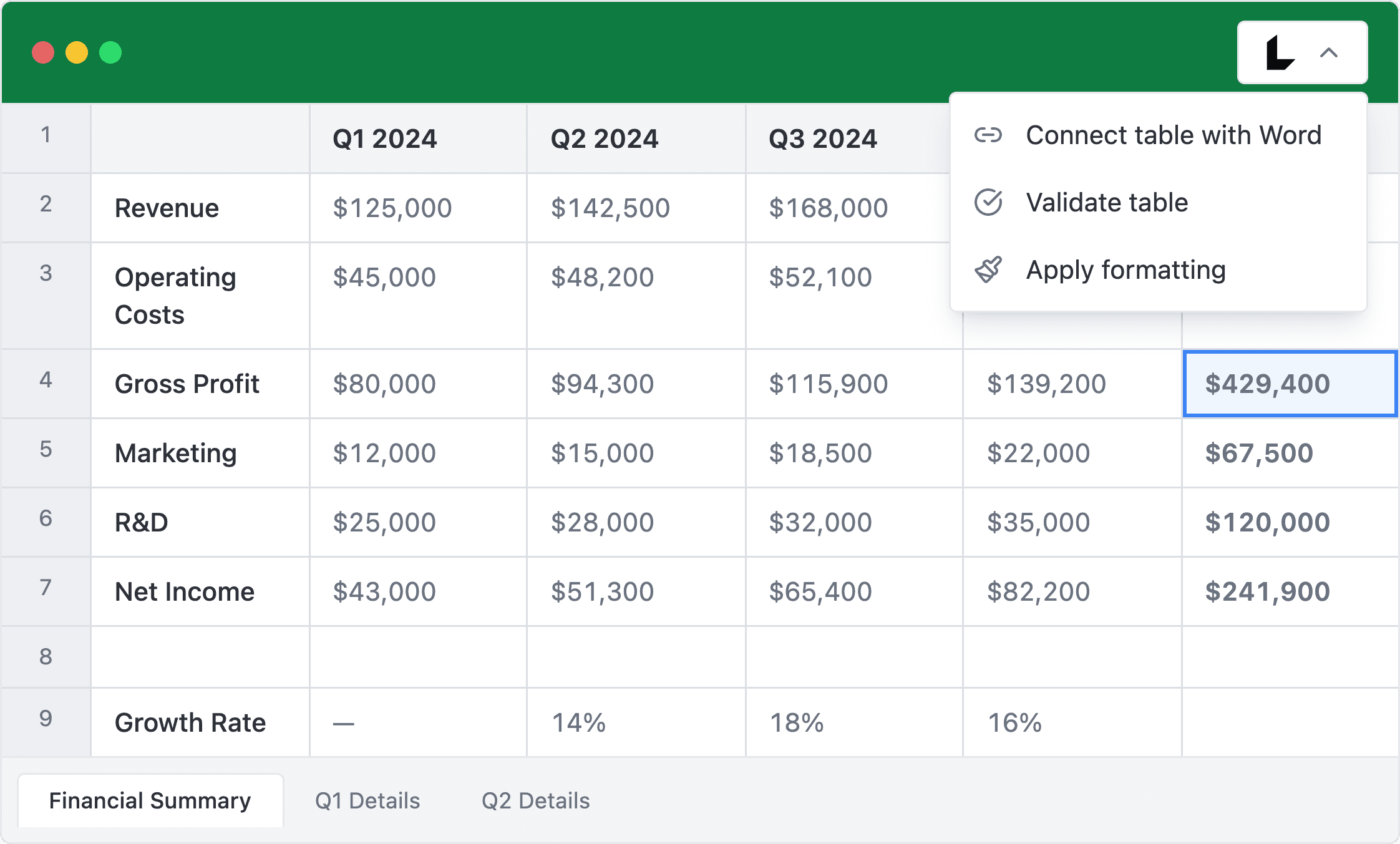
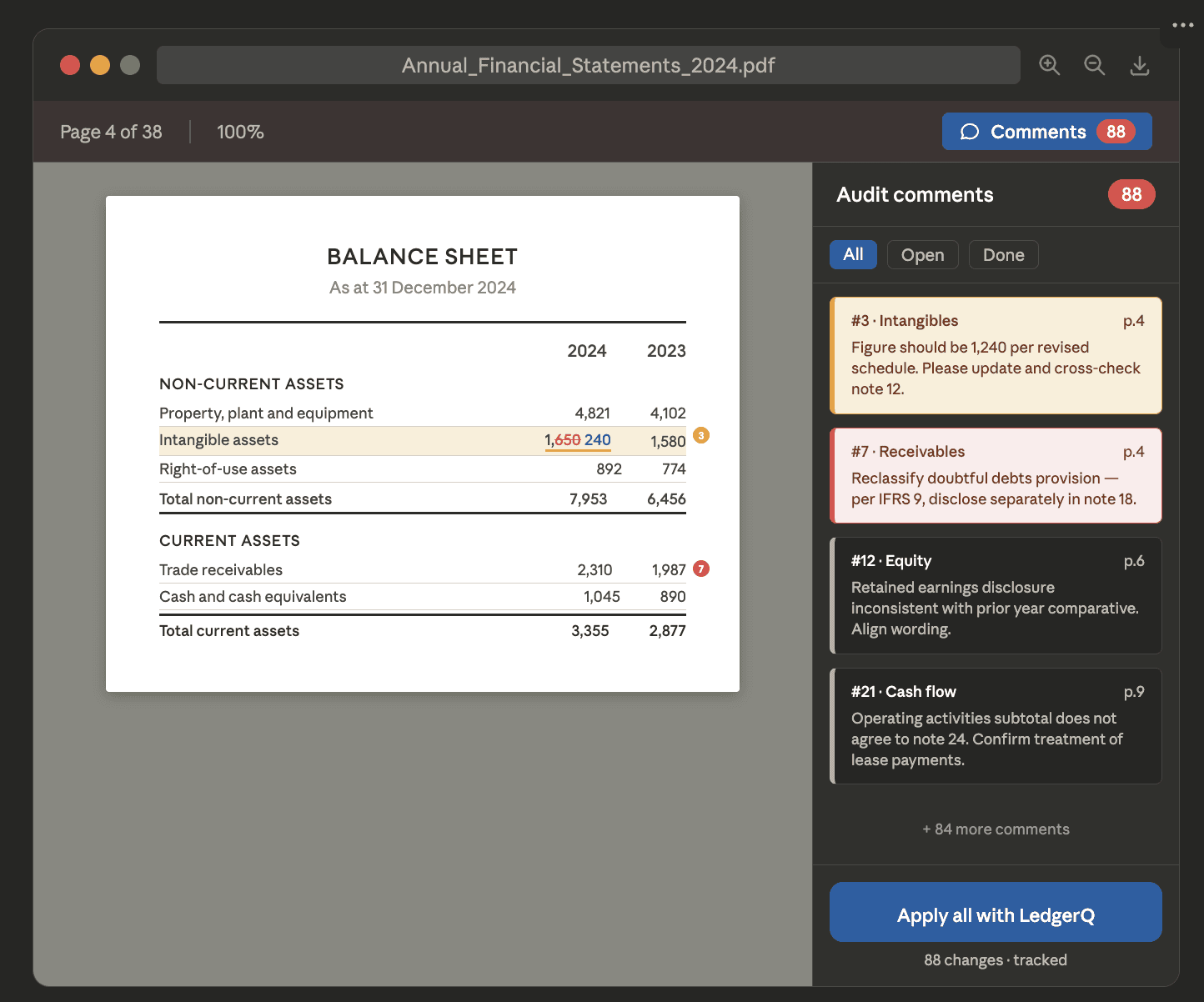
LedgerQ reads the auditor’s comments from PDF and applies changes to the financial statements in Microsoft Word.

Excel-to-Word linking

Keep Word in sync with your Excel

Connect your Excel tables to the financial statements in Word. When the data changes in Excel, the Word document updates automatically — and LedgerQ takes care of the formatting every time.

Excel → Word link

Live link

Excel

Source data

Total assets

2,100,500

Auto-sync

Word

Financial statements

Total assets

2,100,500

Updated automatically — formatting preserved

Stats

Faster, error-free financial statements

Automate preparation, reduce mistakes, and ensure accuracy

Faster preparation

60%

Speed up your financial statement workflow.

Faster preparation

60%

Speed up your financial statement workflow.

Less errors

10x

Reduce number of errors

Less errors

10x

Reduce number of errors

Effortless accuracy

4x

Ensure consistent financial statements.

Effortless accuracy

4x

Ensure consistent financial statements.

Security

Your Data, Secure and Protected

We understand the data sensitivity of financial statements
Security

Your data is encrypted at rest and in transit using industry-standard protocols.

Security

Your data is encrypted at rest and in transit using industry-standard protocols.

Reliability

Designed for uninterrupted performance with robust infrastructure ensuring high availability.

Reliability

Designed for uninterrupted performance with robust infrastructure ensuring high availability.

Confidentiality

We do not share or store your data beyond what is necessary for processing.

FAQs

Frequently Asked Questions

What is LedgerQ?

LedgerQ is software that automates financial statement preparation—not just the first draft, but all subsequent drafts. It links your Excel workbooks to financial statements, automatically applies proper formatting to tables and paragraphs, and updates statements whenever accounting data changes or auditors and other reviewers provide comments.

How secure is LedgerQ?

LedgerQ uses industry-standard protocols to protect your data. Key features include HTTPS, AES-256 bit encryption (bank-grade), SSL, and stateful firewall protection. All data is encrypted at rest and in transit. We enforce strict access controls and continuous monitoring to prevent unauthorized access.

Who are your clients?

Our tool is used by financial reporting, finance, and accounting teams in corporations, accounting firms, and fund administrators.

What are benefits of using LedgerQ?

LedgerQ reduces the time spent on financial statement preparation, minimizes errors, and improves the quality of financial statements through consistent formatting.

What is your pricing model?

We charge a fixed annual fee per user, regardless of how many drafts are prepared during the reporting period. Schedule a demo for a tailored quote.

What is LedgerQ?

LedgerQ is software that automates financial statement preparation—not just the first draft, but all subsequent drafts. It links your Excel workbooks to financial statements, automatically applies proper formatting to tables and paragraphs, and updates statements whenever accounting data changes or auditors and other reviewers provide comments.

How secure is LedgerQ?

LedgerQ uses industry-standard protocols to protect your data. Key features include HTTPS, AES-256 bit encryption (bank-grade), SSL, and stateful firewall protection. All data is encrypted at rest and in transit. We enforce strict access controls and continuous monitoring to prevent unauthorized access.

Who are your clients?

Our tool is used by financial reporting, finance, and accounting teams in corporations, accounting firms, and fund administrators.

What are benefits of using LedgerQ?

LedgerQ reduces the time spent on financial statement preparation, minimizes errors, and improves the quality of financial statements through consistent formatting.

What is your pricing model?

We charge a fixed annual fee per user, regardless of how many drafts are prepared during the reporting period. Schedule a demo for a tailored quote.

Articles

From the blog

Customer Story

How LedgerQ Automated Financial Statement Preparation for Private Equity Funds

Financial Reporting

Let AI Apply Auditor Comments to Your Financial Statements

white and gray concrete building during daytime

Customer Story

How LedgerQ Automated Financial Statement Preparation for Private Equity Funds

Financial Reporting

Let AI Apply Auditor Comments to Your Financial Statements

white and gray concrete building during daytime

Customer Story

How LedgerQ Automated Financial Statement Preparation for Private Equity Funds

Financial Reporting

Let AI Apply Auditor Comments to Your Financial Statements

white and gray concrete building during daytime

Get ahead, get on board